


Music Player - Audio Player
4.736.61K Reviews
App Specs
- Version
- 8.1.3
- Updated On
- License
- Free
- Downloads
- 100,000,000+
- Developer
- Mobile_V5
- Categories
- Music & Audio
- Platform
- Android, iOS
Screenshots
 Analysis by AppCompare
When I want music on my phone without signing into a streaming service or choosing something from an online catalog, a straightforward local player can be the better tool. Music Player - Audio Player is designed for that kind of listening: it helps me browse audio already on a device and shape how it sounds. I see it less as a place to discover new releases and more as a practical way to make a personal music library easy to use.
That distinction matters before installing it. A streaming app is usually the right choice when I want recommendations, cloud libraries, or a large catalog I don’t own. This player makes more sense when I have files I want to keep close at hand, whether they are albums, downloaded tracks, or recordings I have permission to store. Its tools are aimed at playback and listening adjustments, not at producing or publishing music.
Getting Started with Music Player - Audio Player
First off, downloading the Music Player - Audio Player app is a breeze. Whether you're on Android or iOS, it’s just a quick trip to the app store, and you’re ready to go. Once installed, you’re greeted with a sleek and intuitive interface that’s all about making your music experience as smooth as possible.
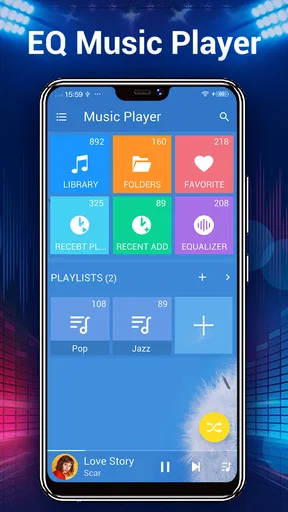
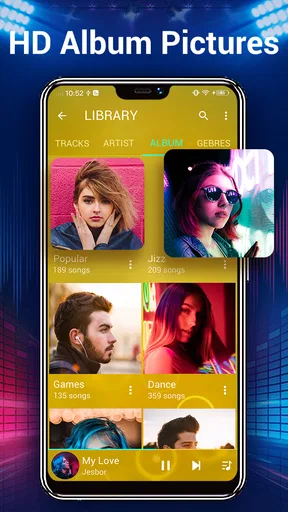
The app automatically scans your device for music files and organizes them neatly. It supports a variety of formats, so whether you’re rocking MP3s or some of those more obscure file types, this app's got you covered. I was pleasantly surprised at how quickly and seamlessly it pulled everything together.
In everyday use, a library scan is most helpful when the files on a phone are reasonably tidy. If an album appears split up or a track has a confusing title, I’d check the audio file’s own tags and folders before blaming the player; a local library can only be as orderly as the material it finds. A simple habit that saves time is to decide on a consistent artist-and-album naming scheme before copying a large collection to a device. That makes browsing and playlist building less of a cleanup job later.
For a commute, I might prepare a short playlist before leaving home, then keep the phone in my pocket and use playback controls rather than browsing while moving. At the gym, the same local-file approach can be useful if I’d rather not depend on a live connection or search through a streaming catalog. The trade-off is that I need to bring the tracks with me and keep the library organized; this is not a substitute for an online service’s on-demand catalog.
Features That Hit the Right Note
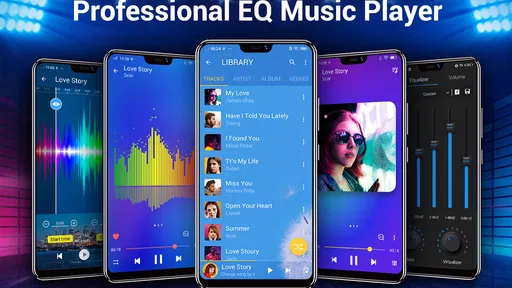
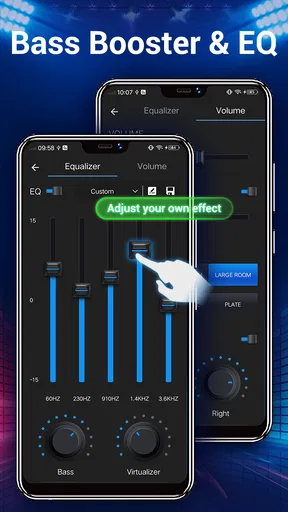
One of the standout features is the equalizer. If you’re like me and love to tweak your audio settings, you’ll find a full range of options to enhance your listening experience. From bass boost to treble adjustments, it’s all just a tap away. You can even save custom settings for different genres, so your rock anthems and jazz classics can sound just the way you like them.
Worth Reading Before You Choose

Switching to Android Auto Means Rethinking Your Driving Routine

Google Calendar Makes a Crowded Week Easier to Manage

Baby Panda World Brings Quick Play to Modern Phones, but Its Game Library Feels Busy

ESPN’s Live Game View Makes Following Close Games Easier

QuizzLand Review: A Good Fit for Short Trivia Breaks, Not Every Player

Basketball Stars: Multiplayer Is Fast, but Can It Recover When Matches Go Wrong?
I find it more useful to make small changes than to push every control to an extreme. A bass lift can make thin-sounding earbuds feel fuller, but too much can muddy vocals and kick drums. For spoken-word recordings, reducing bass or easing back on treble can make long listening sessions more comfortable, depending on the headphones and the recording. These adjustments are personal rather than universal, so I’d treat a saved preset as a starting point, not a promise that every album will sound better with it.
A practical way to compare settings is to use the same short passage of a familiar song, switch between a neutral setup and one adjustment, and listen at the same volume. That helps me avoid mistaking “louder” for “better.” I also keep a relatively restrained setting for mixed playlists, because a strong genre-specific curve that flatters one track can make the next one harsh or boomy. The app’s sound controls are useful when I want to tailor playback, but they cannot repair a poor recording or make every pair of headphones behave alike.
The store describes the player as including a sound changer as well as equalizer and bass-boost tools. I’d approach any sound-changing option as an effect for experimenting, not as a serious editing stage. It can be fun for casual listening, but if I were recording, mixing, or preparing a finished audio file for release, I’d use software built for editing and export instead. A playback effect changes what I hear; it should not be confused with altering the source file itself.
Another feature that’s worth mentioning is the playlist creation tool. It’s super easy to create and manage playlists, and if you’re feeling lazy, the app can also generate mixes based on your listening habits. I gave it a whirl, and it made some pretty spot-on suggestions. It’s like having your own personal DJ!
For a more deliberate listening routine, I’d use separate playlists for different situations rather than one very long queue: one for focused work, another for exercise, and perhaps a calmer selection for winding down. That makes it quicker to get the right mood without repeatedly searching the whole library. If a generated mix misses the mark, I would treat it as a starting point and make a manual playlist; automatic suggestions are convenient, but they may not understand why I grouped particular songs together.
Playlists also offer a lightweight way to manage a collection without reorganizing the actual files. I can gather tracks from different albums for a road trip or put a few reference tracks together for comparing headphones, while leaving the underlying library intact. For a creator who wants to check how a finished mix sounds on ordinary earbuds, that kind of listening queue is handy. It is still a listening workflow, though: the app is not a multitrack editor, a mastering suite, or a publishing platform.
Why I’m Loving This App
Now, let’s talk about the app’s user-friendliness. Navigating through the Music Player - Audio Player is as easy as pie. The menus are straightforward, and everything is just where you’d expect it to be. Plus, it doesn’t bombard you with ads, which is always a win in my book.
That ease matters most when I’m doing something else. If I’m making breakfast and want an album to keep playing, I’d rather get to the music quickly than manage a complicated library interface. The same goes for a short walk or a low-key work session: a player that gets out of the way is more useful than one that turns every listening choice into another task. I’d still spend a little time learning where the controls I use most often sit, especially before relying on them during a commute.
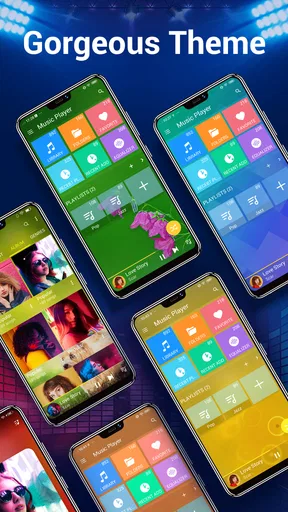
I also appreciate the app’s customization options. You can change themes to suit your mood, and the widgets for your home screen are a nice touch. They’re not just pretty; they’re functional too, letting you control your music without diving into the app itself.
A home-screen widget is particularly useful when I want to pause quickly or skip a track while the phone is already unlocked. It reduces the small friction of opening the player, finding the current song, and then tapping a control. I’d keep the widget simple and place it somewhere easy to reach; a crowded home screen can make a convenience feature less convenient. This sort of control is a practical advantage over players that keep most actions inside their main screen.
There are limits to what I’d expect from a phone-based library player. Its usefulness depends on having audio files available on the device, and a large collection may take more effort to curate than a streaming library that is already searchable and organized. I would also avoid assuming that an equalizer setting will carry over perfectly between speakers, wired headphones, and Bluetooth devices. Each listening setup changes the result, so a preset that works at a desk may not suit a noisy train.
For that reason, this is not my first recommendation for someone whose main goal is music discovery, synced listening across devices, or managing a shared family subscription. A streaming service is generally better for those jobs. Nor would I choose it as the main tool for a musician who needs precise editing, project files, or a dependable handoff of finished audio. The app is strongest when the task is simpler: find music already on the phone, play it, arrange it into queues, and adjust the sound for personal enjoyment.
Wrapping Up the Experience
All in all, the Music Player - Audio Player app has quickly become my go-to music player on my phone. It’s packed with features that cater to both casual listeners and audiophiles looking for that perfect sound. It’s user-friendly, versatile, and most importantly, it lets me enjoy my music without any fuss.
It is a free music and audio app from Mobile_V5, with an Everyone age rating. It first appeared on August 1, 2013, and version 8.0.9 is the current release. Its 4.6 average from around 1.6 million ratings, alongside more than 100 million installs, suggests that many people have found a use for this kind of player. Those figures are useful context, but I’d choose it based on the way I listen: local files, quick playback, playlists, and basic sound shaping.
If you’re looking for a new way to play your tunes, I’d definitely recommend giving this app a shot. You might just find your new favorite music player. So, go ahead and check it out on your app store. Happy listening!
My recommendation is strongest for someone who already has a collection and wants to make it more convenient on a phone. Before moving a whole library, I’d try a few representative files, confirm that they appear as expected, and test the equalizer with the headphones I actually use. That small trial can answer the practical questions that matter most: whether the player handles my usual listening habits, whether I like its controls, and whether its sound adjustments are worth keeping in my routine.
In the end, I see it as a focused everyday player rather than a complete music ecosystem. If I want a library that follows me everywhere through cloud syncing, I’d look elsewhere; if I want to edit and deliver a finished track, I’d use a dedicated creative tool. But for putting music already on my phone within easy reach, making a few thoughtful playback adjustments, and building playlists around real parts of my day, this app is a sensible choice.
Pros
- User-friendly interface
- easy to navigate.
- Supports multiple audio formats seamlessly.
- Customizable equalizer settings available.
- Offline playback without interruptions.
- Minimal battery consumption during use.
Cons
- Contains ads in the free version.
- Limited themes for customization.
- No lyrics integration available.
- Some features require in-app purchases.
- Lacks podcast support.
FAQs for Music Player - Audio Player
What audio formats does Music Player - Audio Player support?
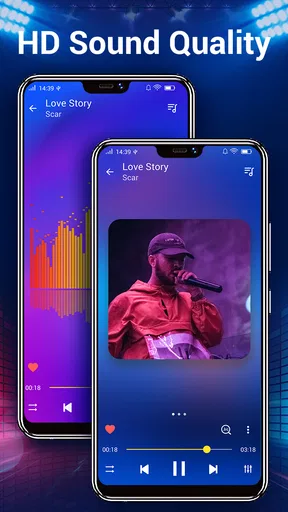
Music Player - Audio Player supports a wide range of audio formats including MP3, WAV, AAC, FLAC, and more. This ensures that you can play almost any audio file without needing to convert it. The app aims to provide high-quality playback, maintaining the integrity of your audio files.
Does Music Player - Audio Player have an equalizer function?
Yes, Music Player - Audio Player features a built-in equalizer with various presets to enhance your listening experience. Users can customize sound settings to suit different music genres, allowing for a more personalized audio experience. The equalizer is user-friendly, making it accessible even for beginners.
Is Music Player - Audio Player free to use?
Music Player - Audio Player offers a free version with basic features. However, there is also a premium version available for purchase, which includes additional features such as an ad-free experience, advanced sound settings, and more customization options. This allows users to choose the option that best suits their needs.
Can I create playlists in Music Player - Audio Player?
Absolutely, the app allows users to easily create, edit, and manage playlists. This feature enables you to organize your music collection according to your preferences, such as by genre, mood, or occasion. Playlist creation is straightforward, making it simple to tailor your listening sessions.
Does Music Player - Audio Player require an internet connection?
No, Music Player - Audio Player does not require an internet connection to play your stored audio files. It is designed to work offline, ensuring that you can enjoy your music anytime, anywhere. However, some features like downloading album art might require internet access.


